What this guide helps you do
Give selected customers free Pro until their account reaches the view or order allowance, control affiliate access by email, and continue on paid Pro.
Before you start
Admin needs Manage plans write access to edit affiliate access and Renew subscription write access to activate offers. An affiliate needs an active, verified login, offer access granted by admin and a currently assigned Free customer. Customers can read their own allowance but cannot activate an offer.
Where to find it
Admin: Plans & Billing. Affiliate: Overview, then open the assigned customer. Customer: Billing & Usage. On a phone, use More to reach admin pages or Billing to read owner usage.
Step by step
-
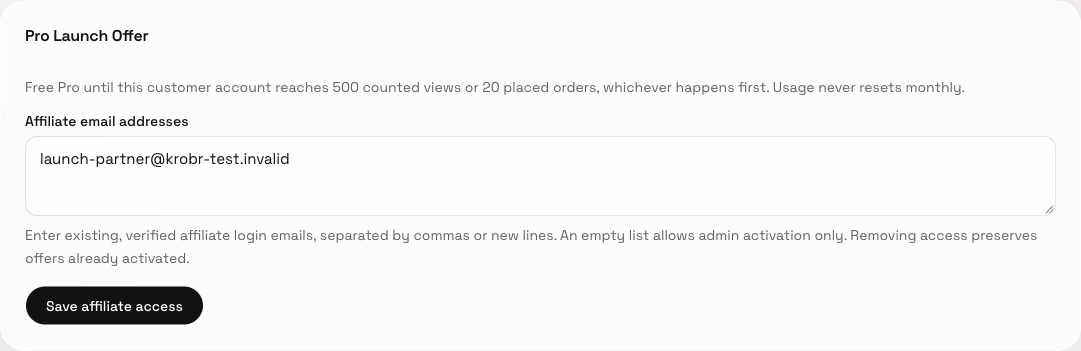
Admin: open Pro Launch Offer in Plans & Billing and enter existing affiliate login emails in Affiliate email addresses, separated by commas or new lines.
-
Choose Save affiliate access and wait for Affiliate access saved. An empty list allows only admin activation. Removing an affiliate preserves offers already activated for customers.
-
Affiliate: open the correct assigned Free customer. Admin can instead search for that customer in Account billing. Check the customer identity before acting.
-
Choose Activate free Pro, read the account-wide allowance in the confirmation and confirm. This grants Pro without an invoice, payment or affiliate earning. The account can receive this offer only once.
-
Read Counted views and Placed orders. Usage starts at activation, is shared across every website in the customer account and never resets monthly. The 20th placed order succeeds. At 500 counted views or 20 placed orders, whichever happens first, new orders pause; websites and existing orders remain available.
-
To continue, arrange a real payment and have the partner/admin record it in the correct billing currency. In Change package, activate paid Pro from the balance. A successful positive charge starts the paid period and lifts the launch pause; an insufficient balance or a fully discounted charge does not.
Understand the choices
There is no calendar expiry. Views use Krobr’s existing once-per-visitor-per-day counting, with obvious bots and owner/admin previews excluded. Drafts, failed placements and duplicate replays do not consume orders. Canceling an order or deleting a website does not restore the allowance. Completed offline counter sales still sync. Owner and partner receive warnings near the allowance and at exhaustion. A new paid period follows ordinary package limits.
Check the result
After activation the customer sees Pro and both allowance meters. After either limit, all websites remain visible and new orders are paused across the account. After paid activation, check the paid period, invoice, balance and resumed ordering.
If something goes wrong
Check every email belongs to an existing active affiliate with a verified login. Invalid lists save nothing and preserve your typed text. If the activation control is absent, check affiliate access, current customer assignment and Free eligibility. An already-used offer cannot restart. On a connection error, retry without recording another payment.
Screenshots

Next steps
Related instructions: customer billing.