What this guide helps you do
Connect a domain you own to your store, verify DNS and ownership, and request optional paid setup help.
Before you start
You must own the store and have a package that includes custom domains. Self-service setup is free and needs no wallet balance. You need access to the domain's DNS settings. Domain registration and registrar renewal are your responsibility.
Where to find it
Workspace → Experiences → store → Custom domain. The same store page is available on phones through Experiences.
Step by step
-
In Your domain, enter the host you want to connect, then choose Connect domain. Eligible packages have no recurring Krobr domain charges.
-
Open DNS settings at the company where the domain is managed. Keep its existing nameservers unless your provider requires a separate change.
-
Add every record shown in Krobr's DNS instructions, copying Type, Name and Value exactly. Include the _krobr-verify TXT proof and any additional provider proof shown.
-
For Cloudflare, set the connecting record to DNS only rather than the orange-cloud proxy. Do not remove unrelated email records.
-
Return to Krobr and use the check control. Wait for DNS changes to spread; Waiting for DNS can last minutes or hours.
-
When the domain is connected, open it in a new browser window and check the correct store.
-
If you need assistance, review the quoted one-time fee and request help from this card. Opening the request neither charges nor reserves money. The helper's claim charges the quoted amount from your wallet, so fund that currency before they claim. To disconnect later, use Remove and read its confirmation.
For an archived store, use Experiences → Archived → row menu → Disconnect [domain]. Archiving alone can leave the domain attached; it creates no recurring domain fee.
Understand the choices
-
Self-service is free. Optional assistance has a one-time quote fixed for that request, including its original currency. Read the current quote on your screen.
-
Removing keeps the Krobr address. Historical monthly charges receive no retrospective refund. A failed assisted setup refunds its original fee automatically after the assigned helper records a reason.
-
Losing the entitlement starts a seven-day grace before disconnection. Returning to an eligible package clears that grace. A zero wallet balance does not pause an entitled domain. The Krobr address remains available subject to the store's status.
Check the result
The card shows a connected state and the domain opens your store securely. DNS and ownership checks complete matching assistance requests automatically. Check whether an amount is quoted, charged or refunded in the request and wallet history.
If something goes wrong
If sign-in cannot finish or a page is unavailable, check the displayed account. Use Switch account to retry the same page or Go to my stores to leave it. Custom-domain sign-in still asks you to confirm the destination. Account recovery steps.
-
Waiting for DNS: compare every record, check duplicate/conflicting records and allow propagation time before checking again.
-
Previously connected elsewhere: add the additional TXT proof shown. Never invent a record value.
-
Connection lost: restore the shown records and disable a proxy. For a legacy billing pause, restore an eligible package and re-check DNS and ownership; no top-up is required to recover the domain.
Screenshots
These screenshots use demonstration data. Your names, amounts and available controls may differ. Current values on your own screen take priority.
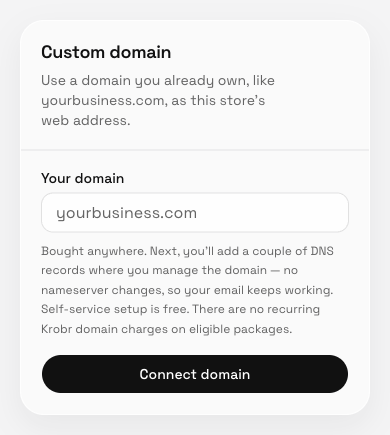
Self-service setup is free; the next step shows the exact DNS instructions.